

Free Social Media Planner for Small Business Owners and Content Creators
If you’ve ever opened Instagram, stared at the “Create Post” screen, and closed the app without sharing anything, you’re not alone.
For small business owners and content creators, social media often feels like one more thing competing for attention. You know consistency and strategy matter, but between running your business, serving clients, and trying to stay visible online, content planning is usually the first thing to fall apart.
That’s exactly why I created a free social media planner designed to help small business owners and creators plan content more intentionally, without overcomplicating the process.
This post walks through:
Why a social media planning tool matters
How my free social media planner works
The benefits of using a social media calendar
Practical tips for applying the tool to your own marketing
How to get started today
Why Small Businesses Need a Social Media Planning Tool
Social media marketing works best when it’s proactive, not reactive.
Without a plan, most small business owners end up:
Posting only when they remember
Repeating the same type of content
Scrambling for ideas at the last minute
Feeling inconsistent or discouraged
A social media planner helps shift your mindset from “What should I post today?” to “What do I want my audience to understand about my business this month?”
That’s the difference between posting for the sake of posting and using social media as part of a broader small business marketing strategy.
What Makes This Free Social Media Planner Different
There are plenty of social media calendars out there. Most of them are either overly complex or so minimal that they don’t actually help you think strategically.
This free social media planning tool was built specifically for:
Small business owners managing their own marketing
Content creators juggling multiple platforms
Service-based businesses focused on visibility and trust
Instead of just telling you when to post, it helps you think through what you’re posting, why you’re posting it, and how it fits into your bigger picture.
What’s Included in the Free Social Media Planning Template
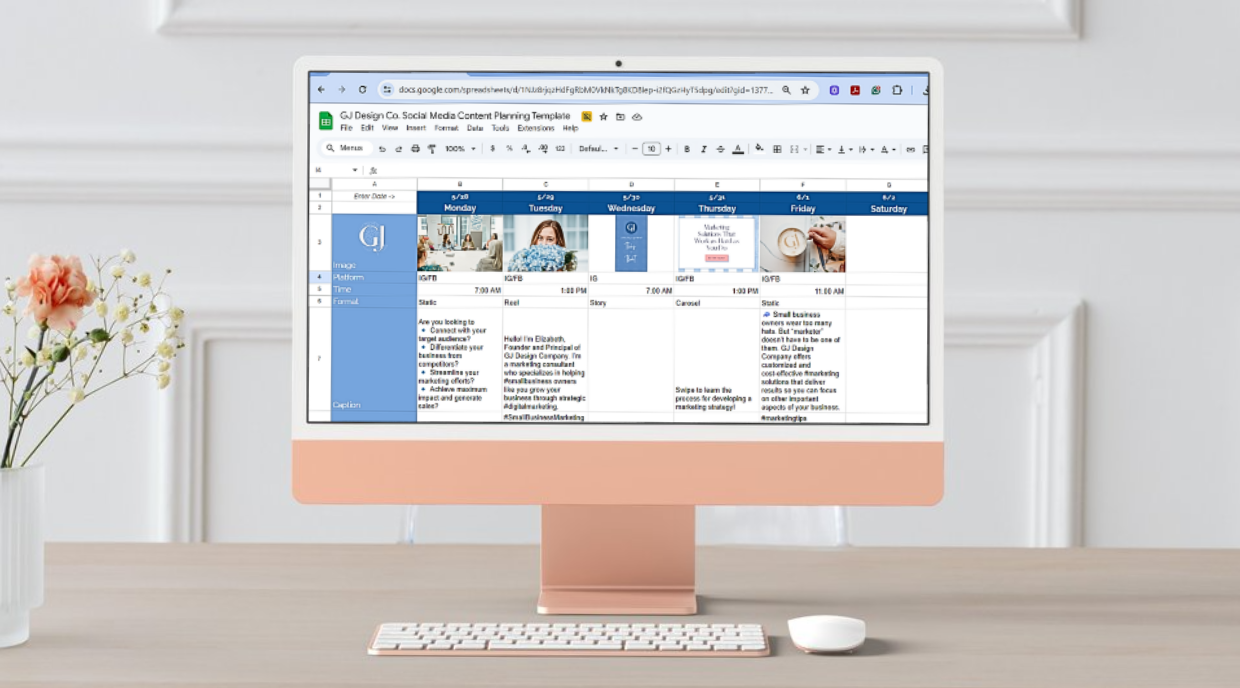
Once you make a copy of the planner, you’ll see weekly tabs that guide your content planning and a month-at-a-glance view that shows how everything works together.
For each post, there’s space to plan:
Image
Upload the image or graphic you plan to use. When you insert images, they populate the monthly overview so you can visually assess balance and variety.
Platform
Choose where the content will live: Instagram, Facebook, LinkedIn, TikTok, X, or another platform.
Time
Plan when you’ll post or schedule content based on when your audience is most active.
Format
Identify whether the post is a static image, reel, carousel, or story. This helps you avoid relying too heavily on one format.
Caption
Draft your caption in advance. This is where you can intentionally incorporate niche-related keywords so platforms know who to show your content to.
Hashtags
Organize and reuse hashtags strategically instead of starting from scratch every time.
Alt Text
Write image descriptions for accessibility and SEO. This is an often-overlooked but important part of social media marketing.
Location
Tag your location when relevant. This is especially helpful for local businesses focused on local SEO.
Tags
Plan who you’ll tag in the post, such as collaborators, clients, or partner businesses.
URL
Track links you plan to include in captions or bios.
Scheduled?
A simple yes/no reminder so you know what’s already been scheduled.
Additional Tabs That Support Content Planning for Creators
Beyond weekly planning, the template includes two helpful support tabs:
Content Pillars
This tab helps you brainstorm content ideas by category. Content pillars keep your content focused and prevent your feed from feeling random.
Examples might include:
Educational content
Behind-the-scenes
Client stories or testimonials
Promotional posts
Personal or brand storytelling
Hashtag Lists
Instead of reinventing the wheel, this tab lets you build hashtag groups by topic or pillar, so you can copy and paste to stay consistent.
Benefits of Using a Social Media Calendar
Using a social media calendar isn’t about posting more. It’s about posting with purpose.
Here’s what small business owners and content creators typically notice when they start planning ahead:
Less stress around content creation
More consistent posting habits
Better balance across platforms and formats
Stronger alignment between content and business goals
Increased confidence in what they’re sharing
Most importantly, a calendar helps you focus on running your business instead of constantly worrying about what to post next.
Tips for Getting the Most Out of This Social Media Planner
To make this tool work for you, keep these best practices in mind:
Start with one month at a time
You don’t need to plan an entire quarter to see results. One month is enough to build momentum.
Use your analytics
Let performance data guide your posting times and formats.
Plan, then refine
Your first draft doesn’t have to be perfect. Planning simply gives you something to get started.
Think in themes, not individual posts
When content connects across a week or a month, it feels more intentional to your audience.
Treat planning as strategy time
This isn’t busywork. It should be focused time spent building visibility and trust.
How This Free Social Media Planner Supports Small Business Marketing
Social media shouldn’t feel like a guessing game.
This free social media planning template is designed to help you:
Simplify content creation
Stay consistent without burnout
Use social media as a strategic tool, not a time drain
When your content is planned with intention, everything else becomes easier — from writing captions to showing up regularly to measuring what’s working.
Get the Free Social Media Planning Tool
If you’re ready to stop stressing over what to post and start showing up with clarity, you can download the planner today.
It’s designed to help small business owners and content creators simplify content creation, stay consistent, and focus on growing their business instead of stressing over social media.
This tool is free, practical, and built to support real-world marketing, not perfection.